# Fieldnotes
> A Hugo theme for a personal site. Posts and notes, trips with maps and photo galleries, maths and code, drawn in six presets with fourteen colour schemes.
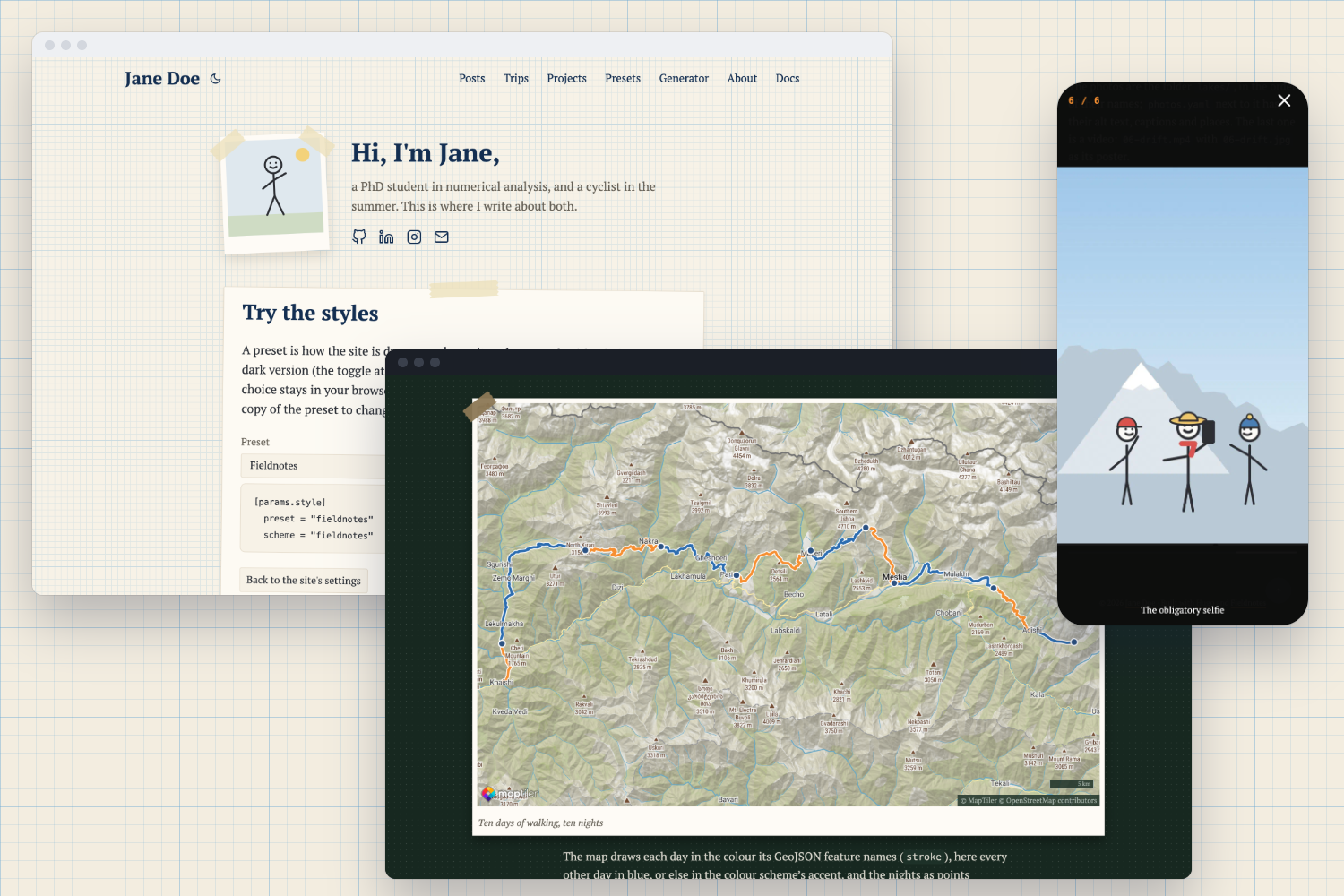
## What it's for
Fieldnotes is for people who write about what they do: a researcher's notes, a cyclist's trips, a hobby that comes
with photos. You write Markdown files; Hugo turns them into a fast, plain website that needs no server, no database
and no updates.
- **Posts and pages** with a home page that introduces you: a photo, a greeting, your profiles.
- **Trips** with a map of the route and galleries of photos and videos that open in a swipeable viewer.
- **Maths and code**: formulas with MathJax, code in your colour scheme with a copy button.
- **Six presets** for how the site is drawn, from taped paper cards to a newspaper or a terminal, and **fourteen
colour schemes**, each with a light and a dark version. Any scheme goes with any preset.
- **Made to be read**: text that grows with the screen, contrast that passes WCAG AA, keyboard navigation,
search-engine data that matches what visitors see.
The [demo](https://fieldnotes.maxfettinger.com/) is a whole site made with Fieldnotes. Its home page has a
playground: switch presets and schemes and the page changes as you click.
## Where to start
New to Hugo? [Getting started](guide/getting-started/) goes from installing the tools to a site online, step by
step. Already have a Hugo site? [Create your site](guide/getting-started/create-your-site/#add-the-theme) shows the
two ways to add the theme.
---
# Docs
> Everything about Fieldnotes: setting up a site, writing, trips with maps and photos, the look, and making it your own.
These docs assume no experience with Hugo. Commands go into a **terminal** (Terminal on macOS, PowerShell or Windows
Terminal on Windows); everything else is text files you edit in any editor, such as
[Visual Studio Code](https://code.visualstudio.com/).
## Words you'll meet
| Word | What it means |
|---|---|
| Hugo | the program that turns your Markdown files into a website |
| theme | the templates, styles and scripts that decide how the site looks and works: here, Fieldnotes |
| site, or project | the folder with your content and your settings |
| `hugo.toml` | your site's settings file, in the folder's top level |
| Markdown | plain text with a few marks for headings, links and lists, in files ending in `.md` |
| front matter | the settings at the top of a Markdown file, between `---` lines |
| section | a folder in `content/`, like `posts/` or `trips/` |
| page bundle | a folder with an `index.md` and the page's files: its photos, its map |
| shortcode | a short tag in Markdown that inserts something bigger: `{{}}` |
| preset | how Fieldnotes draws the site: fonts, background, cards, decoration |
| colour scheme | the colours, in a light and a dark version |
## How the docs are organised
[Getting started](getting-started/) takes you from nothing to a published site. [Writing](writing/) covers pages,
posts and Markdown; [Trips](trips/) the maps and galleries. [Look and feel](look/) explains presets, schemes, fonts
and colours, [Customizing](customizing/) how to change anything beyond them. The [reference](reference/) lists every
setting, and [Help](help/) has troubleshooting, working with an AI assistant, and the roadmap.
---
# Getting started
> From an empty folder to your site online, in four steps.
1. [Install the tools](install-the-tools/): Hugo, Git and, for the recommended setup, Go.
2. [Create your site](create-your-site/) and add Fieldnotes to it.
3. [Write your first post](your-first-post/).
4. [Publish it](publish/) on GitHub Pages, for free.
Each step takes a few minutes. If something goes wrong, [Troubleshooting](/guide/help/troubleshooting/) has the
common problems.
---
# Install the tools
> Hugo builds the site, Git keeps its history and publishes it, Go lets Hugo download the theme.
## Hugo
Fieldnotes needs Hugo 0.158 or newer, in its **extended** edition (it processes your photos).
{{< tabs group="os" >}}
{{< tab "macOS" >}}
With [Homebrew](https://brew.sh/):
```sh
brew install hugo
```
{{< /tab >}}
{{< tab "Windows" >}}
In PowerShell or Windows Terminal:
```sh
winget install Hugo.Hugo.Extended
```
{{< /tab >}}
{{< tab "Linux" >}}
Download the `.deb` or `.tar.gz` with "extended" in its name from
[Hugo's releases](https://github.com/gohugoio/hugo/releases/latest), or:
```sh
sudo snap install hugo
```
{{< /tab >}}
{{< /tabs >}}
Check it, in a new terminal window:
```sh
hugo version
```
It should print a version of 0.158.0 or higher, with `+extended` in it.
## Git
Git keeps the history of your site and is how you publish it.
{{< tabs group="os" >}}
{{< tab "macOS" >}}
```sh
xcode-select --install
```
or `brew install git`.
{{< /tab >}}
{{< tab "Windows" >}}
```sh
winget install Git.Git
```
{{< /tab >}}
{{< tab "Linux" >}}
```sh
sudo apt install git
```
(or your distribution's package manager)
{{< /tab >}}
{{< /tabs >}}
## Go
Go lets Hugo download Fieldnotes as a **Hugo module**, the setup these docs recommend: updating the theme is then one
command. If you'd rather not install Go, add the theme as a Git submodule instead; [Create your
site](/guide/getting-started/create-your-site/#add-the-theme) shows both.
{{< tabs group="os" >}}
{{< tab "macOS" >}}
```sh
brew install go
```
{{< /tab >}}
{{< tab "Windows" >}}
```sh
winget install GoLang.Go
```
{{< /tab >}}
{{< tab "Linux" >}}
Follow [Go's installation guide](https://go.dev/doc/install).
{{< /tab >}}
{{< /tabs >}}
## An editor
Any text editor works. [Visual Studio Code](https://code.visualstudio.com/) is free and shows Markdown and TOML
with colours, which helps spot mistakes.
---
# Create your site
> A new Hugo project, Fieldnotes added to it, and the settings to make it run.
## A new project
In a terminal, go to the folder where your site should live, then:
```sh
hugo new project my-site
cd my-site
git init
```
`my-site` is now a folder with `content/`, `assets/`, `layouts/`, `static/` and a settings file, `hugo.toml`. Open
the folder in your editor.
## Add the theme
{{< tabs group="install" >}}
{{< tab "Hugo module (recommended)" >}}
Make your site a module (the name is any address-like name for your site; it doesn't have to exist):
```sh
hugo mod init github.com/you/my-site
```
Name Fieldnotes in `hugo.toml`, in the settings below, under `[module]`, then download it:
```sh
hugo mod get github.com/maxfettinger/fieldnotes@latest
```
Later, `hugo mod get -u` updates the theme to its newest version.
{{< /tab >}}
{{< tab "Git submodule" >}}
Put a copy of the theme's repository into `themes/fieldnotes`:
```sh
git submodule add https://github.com/maxfettinger/fieldnotes.git themes/fieldnotes
```
In the settings below, replace the `[module]` block with one line, `theme = "fieldnotes"`.
Later, `git submodule update --remote` updates the theme. Whoever clones your site needs
`git clone --recurse-submodules`.
{{< /tab >}}
{{< /tabs >}}
## The settings
Replace everything in `hugo.toml` with this, then put in your name and description:
```toml {file="hugo.toml"}
baseURL = "https://example.org/"
locale = "en-US"
title = "Jane Doe"
disableKinds = ["taxonomy", "term"] # no tag pages: Fieldnotes doesn't show tags yet
[module]
[[module.imports]]
path = "github.com/maxfettinger/fieldnotes"
# Four Markdown settings Fieldnotes needs but can't set itself
[markup.highlight]
noClasses = false # code in the colour scheme's colours
[markup.goldmark.parser]
wrapStandAloneImageWithinParagraph = false # a photo with a title gets a caption
[markup.goldmark.extensions.passthrough]
enable = true # maths reaches MathJax untouched
[markup.goldmark.extensions.passthrough.delimiters]
block = [['\[', '\]'], ['$$', '$$']]
inline = [['\(', '\)']]
[[menus.main]]
name = "Posts"
pageRef = "/posts"
weight = 10
[[menus.main]]
name = "About"
pageRef = "/about"
weight = 20
[params]
description = "Jane Doe writes about long bike trips and numerical analysis."
mainSections = ["posts"]
socialIcons = [
{ name = "github", url = "https://github.com/jane" },
{ name = "email", url = "mailto:jane@example.org" },
]
[params.author]
name = "Jane Doe"
```
`baseURL` is your site's address once it's online; for now any address works. `mainSections` names the sections
whose posts the home page lists. The [configuration reference](/guide/reference/configuration/) lists every setting.
{{< callout "warning" >}}
In TOML, a line after a `[table]` header belongs to that table. Keep plain `[params]` lines like `socialIcons` above
`[params.author]` and any other `[params.something]`, or they end up inside it.
{{< /callout >}}
## The home page and an About page
Create `content/_index.md`, your home page:
```md {file="content/_index.md"}
---
title: "Jane Doe"
greeting: "Hi, I'm Jane,"
---
a PhD student in numerical analysis, and a cyclist in the summer.
```
and `content/about.md`:
```md {file="content/about.md"}
---
title: "About"
---
A few sentences about you.
```
## Run it
```sh
hugo server
```
Hugo builds the site and keeps it up to date while you edit. Open the address it prints, usually
[http://localhost:1313/](http://localhost:1313/). Stop it with Ctrl+C.
The home page shows your greeting and the icons, the header the menu. Next: [your first
post](/guide/getting-started/your-first-post/).
---
# Your first post
> A Markdown file in content/posts/, and it's on the home page.
## Create it
```sh
hugo new content posts/hello-world.md
```
This writes `content/posts/hello-world.md` with a title and today's date filled in:
```md {file="content/posts/hello-world.md"}
---
title: "Hello World"
date: 2026-10-19T09:00:00+02:00
draft: true
summary: ""
---
```
## Write it
Below the second `---`, write in Markdown:
```md
A first paragraph. **Bold**, *italic*, and a [link](https://gohugo.io/).
## A heading
- a list
- with two items
```
Fill in `summary`: one sentence for the post's card on the home page and in the Posts section. Without one,
Fieldnotes takes the beginning of the text.
[Markdown](/guide/writing/markdown/) shows every element and how Fieldnotes draws it.
## See it
A post with `draft: true` is only shown by `hugo server -D` (`-D` for drafts):
```sh
hugo server -D
```
When it's ready, set `draft: false` or delete the line. The post then appears on the home page and under Posts, newest
first.
## Photos in a post
Make the post a folder, a **page bundle**, so its photos sit next to it:
```text
content/posts/hello-world/
├── index.md the post (the old hello-world.md, renamed)
└── view.jpg
```
```md

```
The text in square brackets is the alt text, read out to people who can't see the photo: always write it. The text in
quotes becomes the caption. Fieldnotes makes smaller copies for phones by itself. Next: [publish](/guide/getting-started/publish/).
---
# Publish
> Your site on GitHub Pages, rebuilt by itself on every change.
GitHub Pages hosts static sites for free. A **workflow** (a recipe GitHub runs for you) builds the site with Hugo
every time you push a change, and publishes it.
## Put the site on GitHub
1. Create a free account at [github.com](https://github.com/) and a **new repository**, for example `my-site`,
without a README.
2. In your site's folder, add a `.gitignore` file, so Hugo's output and your secrets stay out of the repository:
```text {file=".gitignore"}
public/
resources/
.hugo_build.lock
.env
```
3. Commit and push (GitHub shows these commands after you create the repository):
```sh
git add .
git commit -m "My site"
git branch -M main
git remote add origin https://github.com/you/my-site.git
git push -u origin main
```
## The workflow
In your repository on GitHub: **Settings → Pages → Source: GitHub Actions**. Then add this file to your site and
push it:
```yaml {file=".github/workflows/pages.yml"}
name: Pages
on:
push:
branches: [main]
workflow_dispatch:
permissions:
contents: read
pages: write
id-token: write
concurrency:
group: pages
cancel-in-progress: false
jobs:
build:
runs-on: ubuntu-latest
steps:
- uses: actions/checkout@v4
with:
submodules: recursive # only needed if you added the theme as a Git submodule
- uses: actions/setup-go@v5
with:
go-version: stable
- name: Install Hugo
run: |
curl -sSL -o "$RUNNER_TEMP/hugo.deb" https://github.com/gohugoio/hugo/releases/download/v0.167.0/hugo_extended_0.167.0_linux-amd64.deb
sudo dpkg -i "$RUNNER_TEMP/hugo.deb"
- uses: actions/configure-pages@v5
id: pages
- name: Build
run: hugo --minify --baseURL "${{ steps.pages.outputs.base_url }}/"
env:
HUGO_MAPTILER_KEY: ${{ secrets.MAPTILER_KEY }} # for trip maps; see Trip maps
- uses: actions/upload-pages-artifact@v3
with:
path: public
deploy:
needs: build
runs-on: ubuntu-latest
environment:
name: github-pages
url: ${{ steps.deployment.outputs.page_url }}
steps:
- id: deployment
uses: actions/deploy-pages@v4
```
Under **Actions** in your repository you can watch it run. When it's done, the site is at
`https://you.github.io/my-site/`, and every push updates it within a minute or two.
## Your own domain
Under **Settings → Pages → Custom domain**, enter it, for example `jane.example.org`, and add the DNS record GitHub
asks for at your domain's provider (a `CNAME` record pointing to `you.github.io`). The workflow takes the new address
by itself.
## Other hosts
Netlify, Cloudflare Pages and Vercel build Hugo sites too. Connect your repository, with `hugo --minify` as the build
command and `public` as the output folder; set the environment variables `HUGO_VERSION` (`0.167.0`) and, for maps,
`HUGO_MAPTILER_KEY`.
---
# Writing
> The home page, posts and pages, and everything Markdown can do in Fieldnotes.
Everything you write lives in `content/`. These chapters cover the [home page](home-page/), [posts and
pages](posts-and-pages/), [Markdown](markdown/), [maths and code](maths-and-code/), and [link cards](link-cards/) for
projects that live elsewhere. Trips with maps and photos have [a chapter of their own](/guide/trips/).
---
# The home page
> A photo, a greeting, a few sentences about you, your profiles, an optional card of your own, and your latest posts.
The home page is `content/_index.md`. Its text is the introduction next to your photo; its front matter adds the rest:
```md {file="content/_index.md"}
---
title: "Jane Doe"
description: "Jane Doe writes about long bike trips and numerical analysis."
greeting: "Hi, I'm Jane,"
photo: "images/photo.jpg"
photoAlt: "Jane hiking in front of glaciers"
displayCard: "now.html"
---
a PhD student in numerical analysis, and a cyclist in the summer.
```
| Key | What it does |
|---|---|
| `title` | the page's title in the browser tab and for search engines; also the greeting if `greeting` is empty |
| `greeting` | the large heading next to the photo |
| `photo` | your photo: a file next to `_index.md` or in `assets/`, like `assets/images/photo.jpg` |
| `photoAlt` | what the photo shows, for people who can't see it |
| `displayCard` | a partial of your own to show on a card under the introduction (below) |
| `description` | the home page's description for search engines |
## The photo
Any JPEG, PNG or WebP works. Fieldnotes crops it to a square (Hugo keeps the part with the most detail) and makes
copies for normal and sharp screens, so a large photo is fine. Crop it to a square yourself if the result cuts off
the wrong part. An SVG drawing is used as it is.
## Social icons
The icons under the introduction come from `params.socialIcons` in `hugo.toml`, in their order:
```toml {file="hugo.toml"}
[params]
socialIcons = [
{ name = "github", url = "https://github.com/jane" },
{ name = "linkedin", url = "https://www.linkedin.com/in/jane" },
{ name = "scholar", url = "https://scholar.google.com/citations?user=…" },
{ name = "email", url = "mailto:jane@example.org" },
]
```
The `name` picks the icon: github, gitlab, linkedin, instagram, twitter (or x), facebook, youtube, twitch, codepen,
codesandbox, dribbble, figma, framer, slack, trello, mail (or email), rss, globe (or website), link, phone,
book-open (or scholar), file-text (or cv). An unknown name gets a link icon. Add `title` to change the text a mouse
pointer shows (`{ name = "globe", url = "…", title = "My blog" }`). Profiles open in a new tab.
The same list tells search engines which profiles are yours ([Search engines](/guide/reference/search-engines/)).
## The display card
A card under the introduction with any HTML you like, not a link: a "now" note, a quote, a small drawing with a
script. Name a partial in `displayCard` and write it in your site's `layouts/_partials/`:
```html {file="layouts/_partials/now.html"}
Now
Writing up chapter three, and planning a ride across the Pyrenees in June.
```
The card takes the preset's card style, tape and all. The [demo's](https://fieldnotes.maxfettinger.com/) display card
holds the style playground.
## The list of posts
Below the introduction, the home page lists the pages of `params.mainSections`, newest first, ten at a time:
```toml {file="hugo.toml"}
[params]
mainSections = ["posts", "trips"]
[pagination]
pagerSize = 10
```
Without `mainSections`, Hugo picks the section with the most pages.
---
# Posts and pages
> Sections, front matter, drafts, the menu, and pages like About.
## Sections
Each folder in `content/` is a **section**: `posts/`, `trips/`, `projects/`, or any name you like. A section has its
own page listing its posts as cards, newest first. Give it a title with an `_index.md`:
```md {file="content/posts/_index.md"}
---
title: "Posts"
---
Optional text above the list.
```
## A post's front matter
```md
---
title: "Across the Pyrenees"
date: 2026-06-14
lastmod: 2026-07-02
summary: "Eight days from the Atlantic to the Mediterranean, mostly uphill."
draft: false
---
```
| Key | What it does |
|---|---|
| `title` | the post's heading and name everywhere |
| `date` | when it was written; sorts the lists, newest first |
| `lastmod` | when it was last changed: more than a day after `date`, the post says "updated" with this date |
| `summary` | the text on the post's card; without it, the beginning of the post |
| `draft` | `true` keeps the post off the published site; `hugo server -D` shows it, marked "Draft" |
| `description` | the description for search engines, if it should differ from the summary |
| `math` | `true` turns on maths for this post ([Maths and code](/guide/writing/maths-and-code/)) |
| `style` | a look of its own for this page ([Presets](/guide/look/presets/#a-page-of-its-own)) |
All keys are in the [front matter reference](/guide/reference/front-matter/).
## A post with files: page bundles
A post with photos, a map or other files is a folder with an `index.md`:
```text
content/posts/across-the-pyrenees/
├── index.md
├── col-du-tourmalet.jpg
└── route.geojson
```
Link the files by their names from `index.md`. Hugo publishes the folder's files with the post.
## The menu
The links in the header are your site's main menu, in `hugo.toml`. `pageRef` is a page's path in `content/`:
```toml {file="hugo.toml"}
[[menus.main]]
name = "Posts"
pageRef = "/posts"
weight = 10
[[menus.main]]
name = "Trips"
pageRef = "/trips"
weight = 20
[[menus.main]]
name = "About"
pageRef = "/about"
weight = 30
```
The link of the section you're in is marked. For a link to another site, use `url = "https://…"` instead of
`pageRef`.
## Pages outside sections
A file at the top of `content/`, like `content/about.md`, is a page of its own: no date, not in any list. Use it for
About, a CV, an imprint.
## Feeds
The home page and every section have an RSS feed (`/index.xml`, `/posts/index.xml`), linked in the page's head, so feed
readers find them. An `rss` social icon can point to it.
---
# Markdown
> Every Markdown element, and what Fieldnotes does with it.
Fieldnotes reads Hugo's Markdown: CommonMark with GitHub's tables, task lists, strikethrough and footnotes. The
[demo's Markdown post](https://fieldnotes.maxfettinger.com/posts/writing-in-markdown/) shows everything on this page
in each preset.
## Headings
```md
## A chapter
### A part of it
```
A post's title is its `#` heading, so start at `##`. Headings get a `#` link to themselves on hover, so readers can
link to a chapter.
## Text and links
```md
**bold**, *italic*, ~~struck out~~, `code`
[another post](/posts/across-the-pyrenees/)
[a chapter on this page](#photos)
[the GPX file](route.gpx)
[Hugo](https://gohugo.io/)
```
- A link to a page, written as its path in `content/`, becomes that page's address, wherever the site is published.
- A file next to the page (in its bundle) is linked by its name.
- A link to another site opens in a new tab, and screen readers say so.
## Photos
```md

```
- **Alt text** in square brackets: what the photo shows, for people who can't see it. Always write it.
- **The address**: a photo next to the page, in its bundle; or in `assets/`; or a full web address.
- **A title** in quotes, optional: for a photo alone in its paragraph, it becomes a caption under the photo.
A photo in the page's bundle or in `assets/` gets copies from 480 to 1600 pixels wide in WebP; each browser loads the
one that fits its screen, and only when it scrolls into view. A click opens it large in the photo viewer, with its
caption, as in a [gallery](/guide/trips/photo-galleries/#the-viewer). Its width and height are known, so the text doesn't
jump while it loads. Photos are framed in the preset's style: white prints on the graph paper, thick borders in
brutalist.
{{< callout >}}
The caption needs `wrapStandAloneImageWithinParagraph = false` under `[markup.goldmark.parser]` in your
`hugo.toml`, as in the [starter settings](/guide/getting-started/create-your-site/#the-settings). Without it, the
title is the text a mouse pointer shows.
{{< /callout >}}
For many photos, use a [gallery](/guide/trips/photo-galleries/).
## Lists and quotes
```md
- an item
- another
1. first
2. second
- [x] done
- [ ] to do
> A quote, with a line in the accent colour beside it.
```
## Tables
```md
| Day | From | To | Distance |
|---|---|---|---:|
| 1 | Hendaye | Saint-Jean-Pied-de-Port | 74 km |
```
A colon on the right of the separator (`---:`) aligns the column to the right, for numbers. A table wider than the
screen scrolls sideways in its own box on phones.
## Footnotes
```md
The hut was full.[^1]
[^1]: In August, book a month ahead.
```
The note's number links to the note at the end of the post, and the note links back.
## A rule
Three dashes alone on a line, with empty lines around them, draw a line across the text:
```md
---
```
## Code
Fenced code, with the language after the backticks, gets colours from your scheme and a copy button:
````md
```python
def hello():
print("hello")
```
````
More in [Maths and code](/guide/writing/maths-and-code/#code).
## HTML
Hugo leaves raw HTML in Markdown out, for safety. For things Markdown can't do, write a
[shortcode](/guide/customizing/templates-and-archetypes/#your-own-shortcodes).
---
# Maths and code
> Formulas with MathJax, and code in your colour scheme's colours.
## Turning maths on
Two things: Markdown must leave formulas alone, and the page must load MathJax.
The first is the passthrough setting in `hugo.toml`, part of the [starter
settings](/guide/getting-started/create-your-site/#the-settings):
```toml {file="hugo.toml"}
[markup.goldmark.extensions.passthrough]
enable = true
[markup.goldmark.extensions.passthrough.delimiters]
block = [['\[', '\]'], ['$$', '$$']]
inline = [['\(', '\)']]
```
The second, per page in its front matter:
```md
---
title: "Error estimates"
math: true
---
```
or for every page with `params.math = true` in `hugo.toml` (a page can then say `math: false`). MathJax loads only
on pages with maths turned on.
## Writing formulas
LaTeX, between `\(` and `\)` in a sentence, and between `$$` lines on its own:
```md
Euler's identity \(e^{i\pi} + 1 = 0\) and an integral:
$$
\int_0^1 x^2 \, dx = \frac{1}{3}
$$
```
`\[` and `\]` work for formulas on their own line too. Dollar signs in a sentence (`$x$`) don't, so prices like $5
stay prices.
## Long formulas on phones
In a sentence, a formula breaks across lines like words. A formula on its own line that is too wide for a phone
scrolls sideways in its own box, and so does one in a sentence that can't break, so the page never scrolls sideways.
## Code
````md
```python
def trapezoid(f, a, b, n):
h = (b - a) / n
return h * (f(a) / 2 + sum(f(a + i * h) for i in range(1, n)) + f(b) / 2)
```
````
Code takes its colours from the colour scheme: comments in its secondary colour, keywords in its primary colour,
strings and numbers in its accent. Every code block has a copy button in its top-right corner (on hover with a
mouse, always on touch screens).
Hugo's options for code work, for example highlighted lines and line numbers:
````md
```go {hl_lines=[2] linenos=true}
func main() {
fmt.Println("hello")
}
```
````
Hugo highlights [hundreds of languages](https://gohugo.io/content-management/syntax-highlighting/#languages).
---
# Link cards
> A project that lives elsewhere, as a card that links there.
A project with its own documentation or repository doesn't need a page on your site, only a card in your list that
links to it:
```md {file="content/projects/my-library.md"}
---
title: "My Library"
date: 2026-10-15
summary: "A small library for something."
params:
link: https://github.com/jane/my-library
build:
render: never
---
```
- `params.link` is where the card links, in a new tab, with a small arrow on the card.
- `build: render: never` keeps Hugo from making a page for it; the card still shows in the section's list and on the
home page if the section is in `mainSections`. The RSS feed links to the project too.
A project with a page of its own is an ordinary post in the `projects` section.
---
# Trips
> A map of the route and galleries of photos and videos, in a post of their own.
A trip is a post with files: the route as a GeoJSON file, and folders of photos. Fieldnotes draws the route on a map
and turns each folder into a row of photos that opens in a full-screen viewer.
- [A trip, start to finish](a-trip-start-to-finish/): the steps, with a ready-made template.
- [Photo galleries](photo-galleries/): folders, captions, videos, and keeping your location private.
- [Trip maps](trip-maps/): the route file, its colours, and the free MapTiler key the map needs.
The demo's [Eleven Days in Svaneti](https://fieldnotes.maxfettinger.com/trips/georgia/) has a map and two
galleries.
---
# A trip, start to finish
> From a new folder to a post with a map and galleries, using the theme's trip template.
## 1. Create the post
Fieldnotes comes with a template (an **archetype**) for trips:
```sh
hugo new content --kind trip trips/pyrenees-by-bike
```
This creates a folder with two files:
```text
content/trips/pyrenees-by-bike/
├── index.md the post, with a map and a gallery ready to fill in
└── photos.yaml alt text, captions and places for the photos
```
`index.md` starts as a draft, with `publishResources: false`, so Hugo publishes only the smaller copies of your photos,
not the originals.
## 2. Add the route
Export your route as GPX from the app you recorded it with (Strava, Komoot, Garmin Connect, a GPS device), turn it
into GeoJSON, and save it as `route.geojson` in the folder. [Trip maps](/guide/trips/trip-maps/#the-route-file) shows
how, and how to colour each day.
## 3. Add photos
Make a folder for each part of the trip, for example `part-1/`, and copy the photos in. Name them so they sort in the
order they should appear, like `01-start.jpg`, `02-coast.jpg`. Then, in `index.md`, a gallery per folder:
```md
{{}}
```
[Photo galleries](/guide/trips/photo-galleries/) covers videos, captions and location data.
## 4. Describe the photos
In `photos.yaml`, write what each photo shows, for people who can't see it, and if you like a caption and a place:
```yaml {file="photos.yaml"}
01-start.jpg:
alt: Two loaded bikes leaning on the sea wall in Hendaye at sunrise
caption: Day one, before the first climb
place: Hendaye, France
```
Hugo warns about photos without alt text when it builds.
## 5. Write and publish
Write the text around the map and galleries, set `draft: false`, and push. If the map shows a note instead of the
route, it needs [a MapTiler key](/guide/trips/trip-maps/#the-maptiler-key).
---
# Photo galleries
> A folder of photos becomes a row that scrolls sideways and opens in a full-screen viewer.
## A gallery
Put photos in a folder next to the post's `index.md` (the post is then a page bundle) and name the folder in the
`gallery` shortcode:
```text
content/trips/sweden/
├── index.md
├── photos.yaml
└── lakes/
├── 01-tent.jpg
├── 02-sunset.jpg
├── 03-swim.mp4
└── 03-swim.jpg
```
```md
{{}}
```
Without a name, `{{}}` uses a folder called `gallery`. A post can have as many galleries as it has
folders.
The photos show in the order of their file names, all the same height in a row that scrolls sideways; on a computer,
arrows at its ends scroll it, and a thin bar below shows how much more there is. Very tall photos are cropped in the
row and shown whole in the viewer.
**Formats:** JPEG, PNG, WebP and AVIF. HEIC photos from an iPhone don't work: export them as JPEG (in Apple Photos,
File → Export).
## The viewer
A click on a photo opens it large in a viewer: [dialog-lightbox](https://github.com/maxfettinger/dialog-lightbox), a
small open-source photo viewer built on the browser's own dialog element, loaded from jsDelivr.
- swipe or use the arrow keys to go through the gallery's photos;
- click a photo, or double-tap it on a phone, to zoom in; drag to look around;
- Escape, the close button, the back button or (on a phone) dragging the photo down close it.
The viewer shows the photo's number, its caption and its place. Adding `#dlb=` and a photo's file name without its
ending to the post's address opens that photo directly: `…/trips/sweden/#dlb=02-sunset`.
## Captions and alt text
`photos.yaml`, next to the gallery folders, describes each photo by its file name:
```yaml {file="photos.yaml"}
01-tent.jpg:
alt: A small tent on a lakeshore at dusk
caption: Our first night by the lake
place: Lake Siljan, Sweden
02-sunset.jpg:
alt: The sun setting over a calm lake, pines in silhouette
```
| Key | What it is |
|---|---|
| `alt` | what the photo shows, read out by screen readers: write it for every photo; Hugo warns about missing ones |
| `caption` | optional, shown in the viewer |
| `place` | optional, shown in the viewer after the caption |
One `photos.yaml` serves all of the post's galleries.
## Videos
An `.mp4` with a photo of the same name, `03-swim.mp4` and `03-swim.jpg`, is a video: the photo is its thumbnail and
the first picture before it plays. In the viewer it plays muted and inline, with play, sound and fullscreen buttons
and a progress bar. Keep videos short and small: GitHub refuses files over 100 MB, and visitors on phones load
them. A minute at 1280 pixels and 2 Mbit/s is about 15 MB.
## Sizes
Fieldnotes makes copies of every photo in WebP: 480 to 1080 pixels wide for the row, and one that fits in 1600 by
1600 pixels for the viewer. Small photos aren't enlarged.
Your originals can be any size. Add this to the post's front matter, so only the copies are published:
```yaml
build:
publishResources: false
```
The first build after adding many photos takes a while; Hugo keeps the copies in `resources/` and reuses them.
## Your location
{{< callout "warning" >}}
**Check your photos for location data before you commit them.** Photos from a phone carry the GPS position where
they were taken: your home, a friend's house. Fieldnotes' copies have no metadata, but the originals in your
repository keep it, and a repository on GitHub is usually public.
{{< /callout >}}
The easiest way is to export photos without location: in Apple Photos, File → Export, untick "Location Information";
on Windows, a photo's Properties → Details → "Remove Properties and Personal Information". Or strip all metadata from a
folder with [ExifTool](https://exiftool.org/):
```sh
exiftool -all= -overwrite_original content/trips/sweden/lakes/
```
---
# Trip maps
> Your route on a topographic map, in the colours you choose, with a free key from MapTiler.
## A map
Put the route file next to the post's `index.md` and name it in the `trip-map` shortcode:
```md
{{}}
```
The map shows the whole route, on MapTiler's topographic map: hills shaded, contour lines, peaks with their heights.
Readers can zoom, switch to 3D terrain, open the map full screen, and click a line or point for its name and
description. In dark mode the map is dark too, and it switches when the reader uses the toggle.
| Option | What it does |
|---|---|
| `geojson` | the route file: next to the page, in `assets/`, or in `static/` |
| `caption` | optional text under the map |
| `style` | another MapTiler map for light mode, like `outdoor-v4` or `streets-v4` (default: `params.map.style`, `topo-v4`) |
| `styleDark` | the same for dark mode (default: `params.map.styleDark`, `topo-v4-dark`) |
[MapTiler's maps](https://www.maptiler.com/maps/) lists the styles.
## The route file
The map reads **GeoJSON**, a text format for lines and points. Apps record routes as **GPX**; turning one into the
other takes a minute in the browser:
1. Export the GPX from your app or device (Strava, Komoot, Garmin Connect: each activity's menu has "Export GPX").
2. Open [geojson.io](https://geojson.io/), then **Open → File** and choose the GPX.
3. **Save → GeoJSON**, and put the file next to the post as `route.geojson`.
geojson.io shows each track as a line you can click; its table lets you add properties, like a name or a colour,
before saving.
A long trip recorded every second makes a large file, slow to load. [mapshaper](https://mapshaper.org/) makes it
smaller: open the GeoJSON, **Simplify** to about 10 %, **Export** as GeoJSON. Under a megabyte is a good size.
## Names and colours
Each line or point can carry properties. The map uses these, the
[simplestyle](https://github.com/mapbox/simplestyle-spec) names most tools write:
| Property | What it does |
|---|---|
| `name` | shown in bold when the line or point is clicked |
| `description` (or `desc`) | shown below the name |
| `stroke` | a line's colour, like `#2b6cb0` |
| `stroke-width` | a line's width in pixels (default 4) |
| `stroke-opacity` | a line's opacity, from 0 to 1 |
| `marker-color` | a point's colour |
| `fill`, `fill-opacity` | an area's colour and opacity |
Without colours, lines and points take your colour scheme's accent. To colour each day differently, make each day its
own track in the GPX (most apps export one per activity), and give each a `stroke` in geojson.io. Points work as
huts, campsites or sights: add them in geojson.io with the marker tool.
## The MapTiler key
The map needs a free key from [MapTiler](https://www.maptiler.com/). Fieldnotes reads it from an **environment
variable**, `HUGO_MAPTILER_KEY`, when Hugo builds the site, so it never goes into your repository. Without one, Hugo
warns and the map's place shows a note on how to add it.
1. **Get a key.** Create an account at [cloud.maptiler.com](https://cloud.maptiler.com/); the default key under
**API keys** works, or create one for your site.
2. **Restrict it.** In the key's settings, under **Allowed HTTP origins**, add your site's address (`jane.github.io`
or your domain) and `localhost`. Every map on the web shows its key in the page; this makes it useless anywhere
else.
3. **Locally:** create a file `.env` in your site's folder (it's in the `.gitignore` from
[Publish](/guide/getting-started/publish/)):
```sh {file=".env"}
export HUGO_MAPTILER_KEY=your-key-here
```
and load it before starting Hugo, in every new terminal:
```sh
source .env
hugo server
```
(On Windows PowerShell: `$env:HUGO_MAPTILER_KEY = "your-key-here"`, then `hugo server`.)
4. **On GitHub:** in your repository, **Settings → Secrets and variables → Actions → New repository secret**, named
`MAPTILER_KEY`, with the key as its value. The [workflow](/guide/getting-started/publish/#the-workflow) passes it to
Hugo.
MapTiler's free plan is for non-commercial sites and covers 5,000 map loads a month; zooming and 3D on a loaded map
are free. Over the limit, the maps stop until the next month.
## Settings for every map
```toml {file="hugo.toml"}
[params.map]
style = "topo-v4" # light mode
styleDark = "topo-v4-dark" # dark mode
sdk = "4.2.0" # the version of MapTiler's map library
```
For a light map in both modes, set `styleDark` to the same style as `style`. A style can also be the address of a
`style.json`, for a map you designed in MapTiler's editor.
---
# Look and feel
> Six presets, fourteen colour schemes, light and dark, fonts, backgrounds and single colours.
The look has two parts you choose independently: a **preset**, how the site is drawn (fonts, background, cards,
decoration), and a **colour scheme**, its colours in a light and a dark version. Any scheme goes with any preset.
On top of both, you can change the fonts, the background and single colours.
The quickest way to choose is the [demo's home page](https://fieldnotes.maxfettinger.com/): its card switches presets
and schemes as you click, and shows the settings to copy. The [theme
generator](https://fieldnotes.maxfettinger.com/generator/) adds fonts and backgrounds.
---
# Presets
> How the site is drawn. Pick one in hugo.toml; it brings its fonts and a colour scheme.
## Choosing one
```toml {file="hugo.toml"}
[params.style]
preset = "editorial"
```
Each preset brings its own colour scheme, which you can replace ([Colour schemes](/guide/look/colour-schemes/)) and its
fonts from Google Fonts, which you can replace too ([Fonts](/guide/look/fonts/)).
## The six
### fieldnotes
PT Serif on graph paper. Cards are cut-outs stuck onto the page with a strip of masking tape, tilted a little, every
other one the other way; your photo, the trip maps and photos in a text are white prints taped at their corners. In
dark mode: a green blackboard with chalk. The default. Its scheme: **fieldnotes**.

### minimal
Inter, thin borders, no background pattern, no shadows, no movement: calm, like a documentation site. Cards darken
their border when hovered instead of lifting. Its scheme: **ink**.

### editorial
A newspaper. Playfair Display headlines over Source Serif text, the site's name large as a masthead over a double rule,
posts in two columns between rules on wide screens, dates in small capitals, a drop cap at the start of a post. Its
scheme: **newsprint**.

### cinematic
For sites about photographs. Inter Tight in light weights, hairlines instead of boxes, square corners, no shadows,
labels in spaced capitals, and taller galleries. Its scheme: **studio**.

### brutalist
IBM Plex Mono throughout, thick borders and hard shadows in the text colour, square corners. Cards jump towards their
shadow when hovered. Its scheme: **ink**.

### terminal
Geist for text and JetBrains Mono for everything that names things, a field of dots, square boxes with stepped
corners, headings marked like Markdown (`##`), post titles as a prompt (`>`), and a blinking cursor after the site's
name. Its scheme: **terminal**.

## A page of its own
A page can have its own preset, scheme or background, in its front matter. A photo story in `cinematic`, on a site in
`fieldnotes`:
```yaml
---
title: "A week in Lofoten"
style:
preset: cinematic
scheme: studio
---
```
Only the page changes; the rest of the site keeps its look. The demo's [Presets
section](https://fieldnotes.maxfettinger.com/presets/) shows each preset on a page of its own this way.
## Your own
A preset is a CSS file and a small data file. [Your own presets and
schemes](/guide/customizing/presets-and-schemes/) shows how to make one, starting from a copy of the one you like best.
---
# Colour schemes
> Fourteen sets of colours, each with a light and a dark version.
## Choosing one
```toml {file="hugo.toml"}
[params.style]
scheme = "nord"
```
Without a `scheme`, the preset's own is used. Any scheme goes with any preset.

## The fourteen
The theme's own first, then popular editor themes. In each, all text reaches a contrast of at least 4.5:1 on the page
and on cards (WCAG AA); where an editor theme's original light colours fall short, they're a little darker here.
| Scheme | Light | Dark |
|---|---|---|
| `fieldnotes` | warm paper, blue-black ink, an orange accent | dark green with chalk-white text |
| `pencil` | light grey, graphite, a blue accent | dark graphite |
| `ink` | white, near-black, a blue accent | blue-black |
| `newsprint` | cream, black, a red accent | warm near-black |
| `studio` | neutral white, a muted gold accent | neutral black |
| `forest` | pale sage, dark green, a rust accent | deep green |
| `ocean` | pale blue-grey, navy, a coral accent | deep navy |
| `terminal` | white, near-black, a green accent | dark blue-grey with green |
| `nord` | Nord's Snow Storm | Nord's Polar Night |
| `gruvbox` | Gruvbox light | Gruvbox dark |
| `everforest` | Everforest light | Everforest dark |
| `rose-pine` | Rosé Pine Dawn | Rosé Pine |
| `catppuccin` | Catppuccin Latte | Catppuccin Mocha |
| `tokyo-night` | Tokyo Night Light | Tokyo Night |
## What a scheme colours
A scheme sets nine colours, each with a job. Code, the photo viewer's labels and the trip map's routes take theirs
from the same nine, so everything matches. To change one or two, see [Backgrounds and
colours](/guide/look/backgrounds-and-colours/#single-colours); to make a whole scheme, [Your own presets and
schemes](/guide/customizing/presets-and-schemes/).
---
# Light and dark
> Both with a switch, following the visitor's system, or only one of them.
```toml {file="hugo.toml"}
[params.mode]
default = "auto" # "light", "dark", or "auto": the visitor's system setting
toggle = true # the switch in the header
```
| You want | `default` | `toggle` |
|---|---|---|
| both, starting from the visitor's system setting | `"auto"` | `true` |
| both, starting light | `"light"` | `true` |
| light only | `"light"` | `false` |
| dark only | `"dark"` | `false` |
| the visitor's system setting, no switch | `"auto"` | `false` |
Without these settings a site starts light, with the switch. With the switch, the visitor's choice is remembered in their browser and wins over `default` on their next visit.
The mode is set before the page is drawn, so it never flashes the other one.
---
# Fonts
> Any family from Google Fonts by its name, or fonts you host yourself.
## From Google Fonts
Each preset loads its own fonts. To use others, name any family on [Google Fonts](https://fonts.google.com/):
```toml {file="hugo.toml"}
[params.fonts]
body = "Source Serif 4"
heading = "Inter" # optional: else the body font
mono = "IBM Plex Mono" # optional: code; else the preset's
```
Fieldnotes loads the body font in regular, bold and both italics, the heading font in bold, and the mono font in
regular, all in one request.
If a family lacks one of these styles, or you want others (a light heading, a semibold body), build the link on
Google Fonts (**Get font → Get embed code**) and give Fieldnotes the whole address; it then loads only that:
```toml {file="hugo.toml"}
[params.fonts]
body = "Inter"
heading = "Inter"
url = "https://fonts.googleapis.com/css2?family=Inter:wght@400;600;800&display=swap"
```
## Fonts you host yourself
Every visit to a page with Google Fonts contacts Google's servers, which in the EU can count as sharing your visitors'
data. To avoid it, download the fonts as `.woff2` files (for example from
[google-webfonts-helper](https://gwfh.mranftl.com/fonts)), put them in your site's `assets/fonts/`, describe them in
your [own CSS](/guide/customizing/your-own-css/), and turn Google Fonts off:
```toml {file="hugo.toml"}
[params.fonts]
google = false
body = "Source Serif 4"
```
```css {file="assets/css/custom.css"}
@font-face {
font-family: "Source Serif 4";
src: url("../fonts/source-serif-4-regular.woff2") format("woff2");
font-weight: 400;
font-display: swap;
}
/* … the same for bold and the italics */
```
The path is relative to `custom.css`. Hugo copies each font file into the site under a name with a fingerprint, so a
new version of a font gets a new address, and the address works wherever the site is published.
With `google = false` and no `body`, the preset's font names stay, and the browser shows them only if they're
installed on the visitor's device; otherwise it falls back to a system font.
---
# Backgrounds and colours
> Graph paper, dots, nothing or your own tile behind the page, and any single colour changed per mode.
## The background
Each preset has a background: graph paper (fieldnotes), dots (terminal) or none. Choose another per mode:
```toml {file="hugo.toml"}
[params.background]
light = "grid" # "grid", "dots", "none", or an image in assets/
dark = "dots"
```
The lines and dots take the scheme's `pattern` colour, faint enough to read text on.
### Your own tile
An image in `assets/` repeats across the page. An SVG tile is ideal: small, sharp at every size, and it can be drawn
in any editor (Inkscape, Figma, Affinity) or by hand. Give it a size if it shouldn't repeat at its own:
```toml {file="hugo.toml"}
[params.background]
light = "images/tile.svg" # assets/images/tile.svg
dark = "dots"
size = "120px"
```
Keep tiles quiet: low contrast with the page, so text stays easy to read. A page can have its own background in its
front matter:
```yaml
style:
background:
light: images/waves.svg
dark: none
```
## Single colours
Change any of a scheme's nine colours, for light and dark mode separately:
```toml {file="hugo.toml"}
[params.colors.light]
accent = "#0b6e4f"
[params.colors.dark]
accent = "#5fd3a8"
```
| Name | What it colours |
|---|---|
| `bg` | the page |
| `surface` | cards, code blocks, the map before it loads |
| `text` | body text |
| `primary` | headings, links, keywords in code |
| `secondary` | dates, summaries, captions, comments in code |
| `tertiary` | small controls: page numbers, back to top, the gallery's bar |
| `accent` | link underlines, hovers, focus rings, the current menu item, strings in code, the photo viewer's labels, map routes |
| `border` | card and code borders |
| `pattern` | the background's lines or dots |
{{< callout >}}
Check the contrast of a colour you change: text needs at least 4.5:1 against `bg` and `surface`, lines and focus
rings 3:1. [WebAIM's contrast checker](https://webaim.org/resources/contrastchecker/) tells you in a second.
{{< /callout >}}
---
# Customizing
> Changing anything the settings don't cover, without touching the theme's files.
## How Hugo finds a file
Your site and the theme have the same folders: `layouts/`, `assets/`, `static/`, `archetypes/`, `data/`. When Hugo
needs a file, it looks in your site first and in the theme second. So a file in your site with the same path as one
of the theme's **replaces** it, and a file with a new path **adds** to it:
```text
my-site/
├── assets/css/custom.css your CSS, added after the theme's
├── layouts/_partials/footer.html replaces the theme's footer
├── layouts/_partials/hooks/head-end.html fills the theme's empty hook
└── archetypes/posts.md a template for new posts
```
Never edit the theme's own files: with a Hugo module you don't have them, and with a submodule the next update
overwrites them.
From the smallest change to the largest:
1. [Your own CSS](your-own-css/): colours, sizes, anything visual.
2. [Hooks](hooks/): analytics, comments, a script on every page.
3. [Your own presets and schemes](presets-and-schemes/): a whole look of your own.
4. [Templates, shortcodes and archetypes](templates-and-archetypes/): change what a part of the page contains, add
your own tags for Markdown, and templates for new posts.
---
# Your own CSS
> One file in your site, added after the theme's CSS, that wins over it.
## The file
Create `assets/css/custom.css` in your site. Fieldnotes adds it after its own CSS, in a cascade layer of its own
that comes last, so your rules win over the theme's whatever their selectors: no `!important`, no long selectors.
```css {file="assets/css/custom.css"}
.card-title {
text-transform: uppercase;
}
```
## Custom properties
Most sizes and colours are custom properties (CSS variables), so a change is often one line. Some of them:
```css {file="assets/css/custom.css"}
:root {
--width-content: 40rem; /* the column of text (45 to 52.5rem, growing on large screens) */
--radius-m: 0; /* corners of cards, code blocks and the map */
--leading: 1.7; /* line height of text */
--font-heading: "Inter", sans-serif;
}
```
| Property | What it is |
|---|---|
| `--width-content` | the text column's width |
| `--width-wide` | the header, photos and maps |
| `--gutter` | space at the window's edges |
| `--font-body`, `--font-heading`, `--font-mono` | the fonts |
| `--step--2` … `--step-4` | type sizes, small to large, growing with the window |
| `--space-3xs` … `--space-xl` | spacing, the same way |
| `--leading`, `--leading-tight` | line heights of text and headings |
| `--radius-s`, `--radius-m` | corners |
| `--shadow`, `--shadow-raised` | shadows of cards and prints |
| `--card-bg`, `--card-border`, `--card-padding-inline` | cards |
| `--heading-weight`, `--heading-transform`, `--heading-spacing` | headings |
| `--pattern-strength` | how strongly the background's lines or dots show |
| `--color-bg` … `--color-border` | the scheme's colours ([Backgrounds and colours](/guide/look/backgrounds-and-colours/#single-colours)) |
The full lists, with comments, are the theme's `assets/css/tokens.css` (sizes) and `assets/css/theme.css` (colours).
## Light, dark, and one preset only
Dark mode sets `data-theme="dark"` on the page, and the preset and scheme in use are named the same way, so a rule
can apply to any of them:
```css {file="assets/css/custom.css"}
/* Dark mode only */
:root[data-theme="dark"] {
--pattern-strength: 10%;
}
/* Only with the fieldnotes preset: green tape */
:root[data-preset="fieldnotes"] {
--tape-bg: rgb(150 200 160 / 0.7);
}
```
## Finding a selector
To find what to change, right-click the element in your browser and choose **Inspect**: the developer tools show its
classes and the rules that style it. The theme's CSS is split by component in `assets/css/components/`, one file
per part, named like its main class (`.card` in `card.css`).
---
# Hooks
> Empty templates in the theme that you fill with HTML of your own, on every page.
| File in your site | Where it goes |
|---|---|
| `layouts/_partials/hooks/head-end.html` | the end of ``: analytics, a font, a script that must run early |
| `layouts/_partials/hooks/body-end.html` | the end of ``: a script, comments, a notice |
The theme has empty versions; yours replace them. The [display card](/guide/writing/home-page/#the-display-card) on the
home page is a hook too, and [your own CSS](/guide/customizing/your-own-css/) the hook for styles.
## Analytics
A privacy-friendly counter like [GoatCounter](https://www.goatcounter.com/) or [Plausible](https://plausible.io/),
only on the published site, not while you write:
```go-html-template {file="layouts/_partials/hooks/head-end.html"}
{{ if hugo.IsProduction }}
{{ end }}
```
## Comments
[giscus](https://giscus.app/) keeps comments in your GitHub repository's Discussions. Configure it on its site, then
paste the script it gives you, only on posts:
```go-html-template {file="layouts/_partials/hooks/body-end.html"}
{{ if and .IsPage .Section }}
{{ end }}
```
`.IsPage .Section` is true for a post in a section, not for the home page or About. Hooks are Hugo templates, so
everything in [Hugo's template docs](https://gohugo.io/templates/) works in them.
---
# Your own presets and schemes
> A look of your own as a plugin, a CSS file and a small data file, in your site's folders.
Presets and schemes are plugins: each is a CSS file and a data file. The theme's sit in its `assets/css/presets/`,
`assets/css/schemes/` and `data/fieldnotes/`; yours go in the same folders of your site. A new name adds one; a theme
preset's name replaces it. Only the preset and scheme a page uses end up in its stylesheet.
## A colour scheme
Two files. The CSS sets the nine colours ([what each does](/guide/look/backgrounds-and-colours/#single-colours)) for
light mode, and again for dark mode:
```css {file="assets/css/schemes/heather.css"}
/* Heather: pale lilac and plum; a dark moor */
:root[data-scheme="heather"] {
--color-bg: #f6f2f7;
--color-surface: #fdfbfd;
--color-text: #2d2430;
--color-primary: #4a2a55;
--color-secondary: #66586b;
--color-tertiary: #e5dce8;
--color-accent: #9b2f6a;
--color-border: #e6dee9;
--pattern-color: #b39bbd;
}
:root[data-scheme="heather"][data-theme="dark"] {
--color-bg: #1d1820;
--color-surface: #251f29;
--color-text: #e6dee9;
--color-primary: #f1e9f4;
--color-secondary: #b3a6b8;
--color-tertiary: #362d3b;
--color-accent: #f29ac8;
--color-border: #342b38;
--pattern-color: #6e5f74;
}
```
The data file gives it a name and a place in lists such as the demo's playground:
```toml {file="data/fieldnotes/schemes/heather.toml"}
name = "Heather"
weight = 200
description = "pale lilac and plum; a dark moor"
```
Use it with `scheme = "heather"` under `[params.style]`. Check every text colour's contrast against `bg`, `surface` and
`tertiary` (at least 4.5:1) before you publish.
## A preset
A preset sets how things are drawn: fonts, corners, shadows, cards, the background, and any rules for the page's
parts. The easiest start is a copy: the demo's [theme generator](https://fieldnotes.maxfettinger.com/generator/)
downloads the preset you're looking at under a name of your own, as both files.
```css {file="assets/css/presets/notebook.css"}
/* Notebook: a lined notebook, rounded cards, a handwritten heading font */
:root[data-preset="notebook"] {
--font-body: "Literata", Georgia, serif;
--font-heading: "Caveat", cursive;
--heading-weight: 600;
--radius-m: 1rem;
--shadow: none;
--card-border: 1px dashed var(--color-border);
}
/* Rules for parts of the page, only with this preset */
[data-preset="notebook"] .card-title {
font-size: var(--step-3);
}
```
```toml {file="data/fieldnotes/presets/notebook.toml"}
name = "Notebook"
weight = 200
description = "A lined notebook, rounded cards, a handwritten heading font."
scheme = "pencil"
fonts = ["Literata:ital,wght@0,400;0,700;1,400", "Caveat:wght@600"]
```
| Key | What it is |
|---|---|
| `name`, `description` | how lists show it |
| `weight` | its place in lists, lower first; the theme's presets use 10 to 60 |
| `scheme` | its colour scheme, used unless a site or page names another |
| `fonts` | the Google Fonts it loads, as family and styles in Google's form (`Family:wght@400;700`) |
The custom properties a preset can set are in the theme's `assets/css/tokens.css` and `theme.css`; `assets/css/main.css`
explains the cascade layers that put a preset's rules above the theme's components. The theme's presets in
`assets/css/presets/` are the best examples: `minimal.css` is short, `fieldnotes.css` shows tape and prints.
## Trying it
Give a single page the new look in its front matter, then switch the whole site once you like it:
```yaml
style:
preset: notebook
```
---
# Templates, shortcodes and archetypes
> Changing what a part of the page contains, adding your own Markdown tags, and templates for new posts.
## Your own version of a template
Every part of a page is a template in the theme's `layouts/`. Copy one to the same path in your site and change the
copy; Hugo uses yours. Get the theme's file from [its repository](https://github.com/maxfettinger/fieldnotes/tree/main/layouts)
(or from `themes/fieldnotes/layouts/` with a submodule).
| Template | What it draws |
|---|---|
| `layouts/_partials/header.html` | the header: the site's name, the menu, the light/dark switch |
| `layouts/_partials/menu.html` | the menu's links |
| `layouts/_partials/footer.html` | the footer |
| `layouts/_partials/page-header.html` | a page's breadcrumbs, title and date |
| `layouts/_partials/meta.html` | the date line under titles and on cards |
| `layouts/_partials/card.html` | a post's card in lists |
| `layouts/_partials/social.html` | the social icons |
| `layouts/_partials/home/intro.html` | the home page's photo, greeting and introduction |
| `layouts/home.html`, `list.html`, `page.html` | the home page, a section's page, a post |
| `layouts/_markup/render-image.html`, `render-link.html`, … | how Markdown's images, links, headings and tables become HTML |
### Example: reading time on every post
`meta.html` draws the date line. A copy with Hugo's reading time added:
```go-html-template {file="layouts/_partials/meta.html"}
{{- if or (not .Date.IsZero) .Draft }}
{{- if not .Date.IsZero }}{{ end }}
{{- if .IsPage }} · {{ .ReadingTime }} min read{{ end }}
{{- if .Draft }} · Draft{{ end -}}
{{- end }}
```
### Example: a footer with an imprint
```go-html-template {file="layouts/_partials/footer.html"}
```
{{< callout "warning" >}}
A copied template doesn't get the theme's updates. Copy as few as you can, and when you update the theme, compare
your copies with its new versions.
{{< /callout >}}
## Your own shortcodes
A shortcode is a template you call from Markdown. Put it in your site's `layouts/_shortcodes/`. A box for a side note:
```go-html-template {file="layouts/_shortcodes/aside.html"}
```
```css {file="assets/css/custom.css"}
.aside {
padding: var(--space-s);
border-inline-start: 3px solid var(--color-accent);
background: var(--color-surface);
}
```
```md
{{}}
Pack a spare tube, even on a short ride.
{{}}
```
Hugo comes with shortcodes of its own too, such as `youtube`, `vimeo` and `figure`; see
[Hugo's shortcodes](https://gohugo.io/shortcodes/).
## Archetypes: templates for new posts
`hugo new content` fills a new file from an **archetype**. Fieldnotes has two:
- `default`: title, date, `draft: true`, an empty summary. Used for every section without one of its own.
- `trip`: a folder with a map, a gallery and `photos.yaml`, used with `--kind trip`
([A trip, start to finish](/guide/trips/a-trip-start-to-finish/)).
Yours go in your site's `archetypes/` and win over the theme's. An archetype named like a section is used for it:
```md {file="archetypes/posts.md"}
---
title: "{{ replace .File.ContentBaseName "-" " " | title }}"
date: {{ .Date }}
draft: true
summary: ""
math: false
---
Start with the most interesting thing.
```
```sh
hugo new content posts/what-i-learned.md
```
An archetype can be a folder (`archetypes/trip/index.md` with files next to it): `hugo new content` then makes a
page bundle with copies of the files. Shortcodes in an archetype need care, because archetypes are Go templates
themselves and would read a shortcode's opening brackets as their own: print the brackets as strings, as the theme's
[trip archetype](https://github.com/maxfettinger/fieldnotes/blob/main/archetypes/trip/index.md) does.
## Icons
The social icons are SVG files in the theme's `assets/icons/`, from [Feather](https://feathericons.com/). For a
profile Fieldnotes has no icon for, put an SVG in your site's `assets/icons/`, named like its `name` in
`socialIcons`. Draw it on a 24 × 24 grid with `stroke="currentColor"`, so it takes the text's colour.
---
# Reference
> Every setting, front matter key and shortcode, in one place.
Look things up here; the chapters before explain them with examples.
---
# Configuration
> Every setting Fieldnotes reads from hugo.toml, with its default.
## Hugo's settings Fieldnotes needs
A theme can't set Markdown settings for your site, so these go in your `hugo.toml`:
```toml {file="hugo.toml"}
[markup.highlight]
noClasses = false # code colours as CSS classes, coloured by the scheme
[markup.goldmark.parser]
wrapStandAloneImageWithinParagraph = false # captions for photos with a title
[markup.goldmark.extensions.passthrough]
enable = true # maths reaches MathJax untouched
[markup.goldmark.extensions.passthrough.delimiters]
block = [['\[', '\]'], ['$$', '$$']]
inline = [['\(', '\)']]
```
And Hugo's own settings that Fieldnotes uses:
| Setting | What it does here |
|---|---|
| `baseURL` | the site's address: links, feeds, search engines |
| `title` | the site's name in the header, the footer and the browser tab |
| `locale` | the page's language, and how dates are written (`en-US`: October 19, 2026) |
| `menus.main` | the header's links ([The menu](/guide/writing/posts-and-pages/#the-menu)) |
| `pagination.pagerSize` | posts per page in lists (default 10) |
| `enableRobotsTXT` | `true` publishes Hugo's `robots.txt` |
| `disableKinds` | `["taxonomy", "term"]` leaves out tag and category pages, which Fieldnotes doesn't link to yet |
## Params
Under `[params]`. Plain keys first, then the tables (`[params.style]` and so on), because in TOML a key after a table
header belongs to that table.
| Param | Default | What it does |
|---|---|---|
| `description` | `""` | the site's description for search engines and link previews |
| `mainSections` | the largest section | the sections whose posts the home page lists |
| `math` | `false` | MathJax on every page; a page's `math` wins |
| `socialIcons` | none | the home page's icons: a list of `{ name, url, title }` ([Social icons](/guide/writing/home-page/#social-icons)) |
| `images` | none | a fallback image for link previews, a path in `assets/` |
| `author.name` | none | your name for search engines ([Search engines](/guide/reference/search-engines/)) |
| `author.alternateName` | none | another form of your name |
| `author.jobTitle` | none | what you do |
| `author.image` | the home photo | a photo of you for search engines |
| `author.affiliation.name`, `.url` | none | where you work or study |
| `style.preset` | `"fieldnotes"` | the [preset](/guide/look/presets/) |
| `style.scheme` | the preset's | the [colour scheme](/guide/look/colour-schemes/) |
| `mode.default` | `"light"` | `"light"`, `"dark"` or `"auto"` ([Light and dark](/guide/look/light-and-dark/)) |
| `mode.toggle` | `true` | the light/dark switch in the header |
| `fonts.body`, `.heading`, `.mono` | the preset's | [fonts](/guide/look/fonts/) from Google Fonts, by family name |
| `fonts.url` | `""` | a whole Google Fonts address, instead of the one Fieldnotes builds |
| `fonts.google` | `true` | `false` loads no fonts from Google |
| `background.light`, `.dark` | the preset's | `"grid"`, `"dots"`, `"none"` or an image in `assets/` ([Backgrounds](/guide/look/backgrounds-and-colours/)) |
| `background.size` | `""` | the size an image tile repeats at, like `"120px"` |
| `colors.light.*`, `colors.dark.*` | the scheme's | single colours: `bg`, `surface`, `text`, `primary`, `secondary`, `tertiary`, `accent`, `border`, `pattern` |
| `favicon.svg` | `"favicon.svg"` | the favicon, a file in `static/` (the theme has one) |
| `favicon.ico` | `"favicon.ico"` | the favicon for older browsers |
| `favicon.appleTouch` | `"apple-touch-icon.png"` | a 180 × 180 PNG for phone home screens |
| `map.style` | `"topo-v4"` | the [trip maps'](/guide/trips/trip-maps/) MapTiler style in light mode |
| `map.styleDark` | `"topo-v4-dark"` | the same in dark mode |
| `map.sdk` | `"4.2.0"` | the version of MapTiler's map library |
| `gallery.lightbox` | `"0.3.1"` | the version of [dialog-lightbox](https://github.com/maxfettinger/dialog-lightbox), the photo viewer |
## Environment variables
| Variable | What it does |
|---|---|
| `HUGO_MAPTILER_KEY` | the MapTiler key for trip maps, read when Hugo builds the site ([The MapTiler key](/guide/trips/trip-maps/#the-maptiler-key)) |
## A complete example
The [demo's `hugo.toml`](https://github.com/maxfettinger/fieldnotes/blob/main/exampleSite/hugo.toml) sets almost
everything, with a comment on each line.
---
# Front matter
> The keys Fieldnotes reads at the top of a page.
## Every page
| Key | What it does |
|---|---|
| `title` | the page's heading and its name in lists, the browser tab and link previews |
| `date` | when it was written: shown under the title, sorts lists newest first |
| `lastmod` | when it changed: more than a day after `date`, shown as "updated" |
| `summary` | the text on the page's card in lists |
| `description` | the description for search engines and link previews; else the summary |
| `draft` | `true` keeps the page off the published site |
| `math` | `true` loads MathJax for the page ([Maths and code](/guide/writing/maths-and-code/)) |
| `images` | images for link previews, like `["cover.jpg"]` (a file next to the page or in `assets/`) |
| `style.preset` | the page's own [preset](/guide/look/presets/#a-page-of-its-own) |
| `style.scheme` | the page's own colour scheme |
| `style.background` | the page's own background: `light`, `dark`, `size` as in `params.background` |
| `params.link` | for a [link card](/guide/writing/link-cards/): where its card links |
| `build` | Hugo's build options: `publishResources: false` for trips, `render: never` for link cards |
Without `images`, link previews use a file next to the page whose name contains `feature`, `cover` or `thumbnail`,
then `params.images`.
Hugo's other keys work as usual: `slug` and `url` (the page's address), `aliases` (old addresses that redirect),
`weight` (sorts before the date), `linkTitle` (a shorter name for menus).
## The home page
`content/_index.md` also reads:
| Key | What it does |
|---|---|
| `greeting` | the heading next to the photo; else the site's title |
| `photo` | your photo: a file next to `_index.md` or in `assets/` |
| `photoAlt` | what the photo shows |
| `displayCard` | a partial in `layouts/_partials/` to show on a card ([The display card](/guide/writing/home-page/#the-display-card)) |
Its text is the introduction next to the photo.
## An example
```yaml
---
title: "Across the Pyrenees"
date: 2026-06-14
lastmod: 2026-07-02
summary: "Eight days from the Atlantic to the Mediterranean, mostly uphill."
images: ["tourmalet.jpg"]
math: false
style:
preset: cinematic
build:
publishResources: false
---
```
---
# Shortcodes
> The two shortcodes Fieldnotes adds, and their options.
## gallery
A folder of photos and videos next to the page, as a row that opens in the viewer. [Photo
galleries](/guide/trips/photo-galleries/) explains it.
```md
{{}}
{{}}
```
| Option | Default | |
|---|---|---|
| the folder's name | `gallery` | a folder next to the page's `index.md` |
Alt text, captions and places come from `photos.yaml` next to the folder.
## trip-map
A route on a map. [Trip maps](/guide/trips/trip-maps/) explains it.
```md
{{}}
```
| Option | Default | |
|---|---|---|
| `geojson` | none | the route: a GeoJSON file next to the page, in `assets/` or in `static/` |
| `caption` | none | text under the map |
| `style` | `params.map.style` | a MapTiler style or a `style.json` address, for light mode |
| `styleDark` | `params.map.styleDark` | the same for dark mode |
## Hugo's own
Hugo's built-in shortcodes work too: `youtube`, `vimeo`, `figure`, `highlight`, `details` and more. See
[Hugo's shortcodes](https://gohugo.io/shortcodes/).
---
# Search engines
> What Fieldnotes tells search engines and link previews about your site and you, without anything visible.
## On every page
- a **title** (the page's, then the site's) and a **description** (`description`, else the summary, else
`params.description`);
- a **canonical address**, so copies of a page don't compete with it;
- **Open Graph** and **Twitter card** tags, for previews when a link is shared (Hugo's own templates), with an image
from the page's `images` ([Front matter](/guide/reference/front-matter/));
- the page's **RSS feed** and your **favicon**.
Hugo also writes a `sitemap.xml` listing every page, and with `enableRobotsTXT = true` a `robots.txt`.
## About you
Name yourself under `params.author`:
```toml {file="hugo.toml"}
[params.author]
name = "Jane Doe"
alternateName = "J. Doe"
jobTitle = "PhD student"
image = "images/photo.jpg"
[params.author.affiliation]
name = "University of Example"
url = "https://example.org/university"
```
From this, Fieldnotes writes **structured data** (JSON-LD, the format Google reads): the home page is your profile
page, about you as a person, with your social profiles from `socialIcons` as "same as" links (except email and RSS);
every post is an article by you. This helps a search for your name find your site, and connects it with your
profiles.
Google's rule is that structured data must match what visitors see, which it does here: the profiles are the icons
on your home page. You can check the result with [Schema.org's validator](https://validator.schema.org/) or Google's
[Rich Results Test](https://search.google.com/test/rich-results).
## Getting found
A new site takes days to weeks to appear in search results. [Google Search Console](https://search.google.com/search-console)
shows whether Google has found it; submitting `https://your-site/sitemap.xml` there speeds it up.
---
# Help
> Common problems, working with an AI assistant, and what's planned.
- [Troubleshooting](troubleshooting/): what to do when something doesn't look or work as it should.
- [Working with an AI assistant](ai-assistants/): how to give one the context it needs.
- [Roadmap](roadmap/): features Fieldnotes doesn't have yet.
Found a bug, or missing something? [Open an issue](https://github.com/maxfettinger/fieldnotes/issues) on GitHub.
---
# Troubleshooting
> Symptoms, their usual causes, and the fix.
## Building
**`hugo: command not found`, or "requires Hugo 0.158.0 or newer".** Hugo isn't installed, or an old one is. See
[Install the tools](/guide/getting-started/install-the-tools/), then open a new terminal and check `hugo version`.
**"module … not found" or "go: command not found".** The theme is a Hugo module, which needs Go. Install Go, or add
the theme as a Git submodule instead ([Create your site](/guide/getting-started/create-your-site/#add-the-theme)).
**The site has no styles at all.** Hugo didn't find the theme. Check the `[module]` block (or `theme = "fieldnotes"`
with a submodule) and that `hugo mod get` ran.
**A setting has no effect.** Most often TOML: a line after `[params.something]` belongs to that table. Move plain
`[params]` lines above all `[params.…]` tables.
**A change doesn't show while `hugo server` runs.** Stop it with Ctrl+C and start it again; after changing
`hugo.toml`, a data file or a new template, the running server sometimes misses it.
## Writing
**Maths shows as plain text with backslashes.** The passthrough setting is missing from `hugo.toml`, or the page
lacks `math: true` ([Maths and code](/guide/writing/maths-and-code/)).
**Code has no colours.** `noClasses = false` under `[markup.highlight]` is missing.
**A photo's title isn't shown as a caption.** `wrapStandAloneImageWithinParagraph = false` under
`[markup.goldmark.parser]` is missing, or the photo shares its paragraph with text.
**A post doesn't appear.** It's a draft (`draft: true`), its date is in the future, or its section isn't in
`mainSections`. `hugo server -D` shows drafts.
**HTML in a post is missing.** Hugo leaves raw HTML in Markdown out on purpose; write a
[shortcode](/guide/customizing/templates-and-archetypes/#your-own-shortcodes) instead.
## Trips
**"gallery: … can't be processed (heic)".** HEIC photos can't be processed; export them as JPEG.
**Warnings about photos without alt text.** Write an `alt` for each in `photos.yaml`
([Photo galleries](/guide/trips/photo-galleries/#captions-and-alt-text)).
**The map shows "The map needs a MapTiler key".** `HUGO_MAPTILER_KEY` wasn't set when Hugo built the site: run
`source .env` before `hugo server`, or add the `MAPTILER_KEY` secret on GitHub ([The MapTiler
key](/guide/trips/trip-maps/#the-maptiler-key)).
**The map stays grey or blank online.** Your site's address isn't among the key's allowed origins in MapTiler, or the
month's free map loads are used up. Your browser's developer console (right-click → Inspect → Console) names the
cause.
## Publishing
**The published site has no styles, or links lead to the wrong place.** `baseURL` doesn't match the address. With
the [workflow](/guide/getting-started/publish/#the-workflow), the address comes from GitHub; check that Pages' source
is "GitHub Actions".
**The workflow fails at "hugo".** Its log under **Actions** shows Hugo's error, the same you'd see locally: run
`hugo` on your computer to reproduce it.
---
# Working with an AI assistant
> Giving an assistant like ChatGPT, Claude or Copilot the context to change your site well.
AI assistants are good at the small tasks a site needs: a CSS change, a shortcode, a workflow fix. They do better
with the right context, because what they learned about Hugo and this theme may be out of date.
**Give it these docs.** They're available as plain text for exactly this:
[llms.txt](https://fieldnotes.maxfettinger.com/docs/llms.txt) lists every page, and
[llms-full.txt](https://fieldnotes.maxfettinger.com/docs/llms-full.txt) has all of them in one file, to attach or
paste. Each page also has a Markdown version: add `index.md` to its address.
**Leave instructions in your site.** Coding assistants read a file named `AGENTS.md` at the top of your repository
(Claude Code reads `CLAUDE.md`). A few lines save explaining the same things every time:
```md {file="AGENTS.md"}
# My site
A Hugo site with the Fieldnotes theme (a Hugo module: github.com/maxfettinger/fieldnotes).
Docs for the theme: https://fieldnotes.maxfettinger.com/docs/llms-full.txt
- Don't edit the theme. Change the look in assets/css/custom.css and hugo.toml; override templates by copying
them to the same path in layouts/.
- Templates use Hugo 0.146+ names: layouts/_partials/, _shortcodes/, _markup/. Read Hugo's current docs
(https://gohugo.io/documentation/) before writing template code.
- Check every change with `hugo server` and `hugo --printPathWarnings`.
- Never commit .env or put the MapTiler key in a file; it comes from HUGO_MAPTILER_KEY.
```
**Review what it changes.** Run `hugo server` and look at the result, in light and dark mode and on a phone-sized
window, before you commit. Keep secrets like your MapTiler key out of the chat.
---
# Roadmap
> What Fieldnotes doesn't do yet, and may, if people need it.
Fieldnotes 1.0 does what a personal site with trips and research notes needs. These are left out for now. If you need
one, [open an issue](https://github.com/maxfettinger/fieldnotes/issues) and say what for: features get built on
demand.
| Feature | Today | Notes |
|---|---|---|
| Comments | add [giscus](https://giscus.app/) with a [hook](/guide/customizing/hooks/#comments) | built in, with a setting |
| Search | none | [Pagefind](https://pagefind.app/), which needs no server |
| Tags and categories | Hugo makes a page per tag, in the list layout | tags on cards and posts, linked to their pages |
| Translations | the theme's few words are English | multilingual sites, translated labels |
| Table of contents | none | for long posts, beside the text on wide screens |
| Reading time | [a template override](/guide/customizing/templates-and-archetypes/#example-reading-time-on-every-post) | a setting |
| Related posts | none | Hugo's related content, under each post |
| Elevation profile | none | under the trip map, from the route's heights |
| GPX files | convert to GeoJSON | read GPX directly |
| Maps without a key | MapTiler needs one | a keyless map provider as an option |
| Galleries in a grid | a scrolling row | a grid layout as an option |
| Newsletter sign-up | a hook | a form for a common provider |
Already there, and easy to miss: [light and dark maps](/guide/trips/trip-maps/), [videos in
galleries](/guide/trips/photo-galleries/#videos), [your own presets and schemes](/guide/customizing/presets-and-schemes/),
[a trip template](/guide/trips/a-trip-start-to-finish/), and these docs as [llms.txt](https://fieldnotes.maxfettinger.com/docs/llms.txt).